|
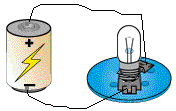
Realistic View Tool: This tool changes the display of objects and circuits in the simulation window to Realistic View. Realistic View is the default display mode.
Consult the help pages of individual elements to see how they are represented in Realistic View. By default, objects in Realistic View are not located on a grid. When you move or place an object, the object stays where you put it. It does not snap to a grid location. You can turn on (off) the snap to grid property in the background properties. Note: Graphics objects drawn or placed (using the Graphics Palette) in Realistic View do not appear in Schematic View. The reverse is also true. |